Facial expression detection



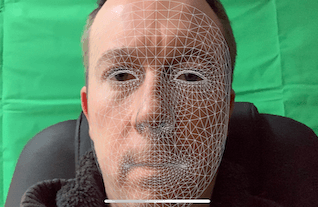
Description
In this lesson, we look at the large number of facial expressions that ARKit face tracking can recognise.
Notice for the first time we are using material.FillMode = SCNFillMode.Lines which works well to show the contours of the face.
We interrogate a property on the detected FaceAnchor called BlendShapes to get information about different parts of the face.
While ARKit is able to track many more expressions than the code sample below, I have decided to detect the following expressions and change the colour of the FaceGeometry material lines accordingly.
- Smile - Pink
- Mouth Frown - Brown
- EyesWide - Green
- BrowUp - Cyan
- TongueOut - Red
- MouthFunnel - Yellow
- Eyes Left/Right - Magenta
- CheeksPuff - Orange
- EyesBlink - Blue
The full list of detectable available facial expressions is at ARFaceAnchor.BlendShapeLocation.
Video
Code
Next Step : People occlusion
After you have mastered this you should try People occlusion